




58 ways to crush your Shopify & eCommerce competition 🤖
Actionable strategies to turn visitors into customers and blow your competitors out of the water. ...






Google Search Console is an indispensable technical SEO tool. It lets you see how and where you appear in search, how much of that search traffic leads to site visits, and much more.
By default its reports cap at 1000 rows. This is OK for small sites with growing search visibility, but established sites quickly bump up against this limit and it impacts the conclusions you can draw from the data.
There is no way to extend the limit within GSC itself, but you can use the GSC API to run custom reports and dig deeper into the data.
The instructions below will set up the functionality for one user on your local machine to generate larger reports (50k per queried day vs 1000) that facilitate much deeper analysis.
There’s nothing in here about how to actually use the data – that’s for another post.
The post covers:
These steps will create the environment where you can use the GSC API to pull more data. Once you finish these steps you’ll have a functional connection, permission to pull data from one GSC Property, and the knowledge on how to grant permission to more Properties.
If you’re only ever going to access ONE GSC account you can skip steps 10-14 because the OAuth will create a token on your first time running the script that grants permission to the email address associated with the account.
If, like me, you have access to multiple GSC accounts, creating the Service account in step 10 and adding it as a user with Full access rights to every GSC Property you want to pull data from is the most efficient route.
These steps will pull the specific data I needed, which is full 16m historic data I could use to see all search terms that have generated impressions for a client’s site across two main geographic locations (UK and US).
You can tweak the script in the section below this one to pull a different timeframe and/or different regions. If you want to run your own script to pull a different slice of data, you’ll need to write/generate your own Python code for step 4.
CLIENT_SECRET_FILE valueSITE_URL for your domain – this must match the domain of the Property you granted GSC permission to earlier. Note that this will run a 16 month crawl.python3 gsc_export.py in Command Prompt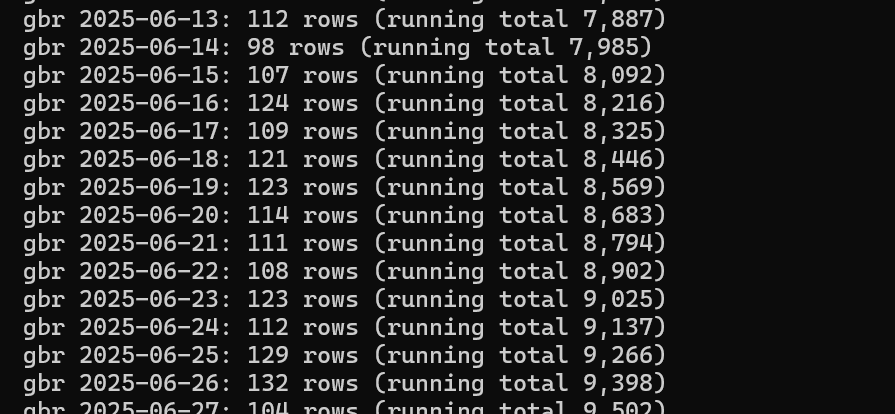
Courtesy of Claude Opus 5 High:
import csv
import json
import os
import random
import time
from datetime import date, timedelta

from googleapiclient.discovery import build
from googleapiclient.errors import HttpError

# --------------------------------------------------------------------------
# CONFIG
# --------------------------------------------------------------------------
SITE_URL = "sc-domain:example.com"

MODE = "trends"          # "trends" or "discovery"

END_DATE = date.today() - timedelta(days=3)
START_DATE = END_DATE - timedelta(days=480)

COUNTRIES = ["gbr", "usa"]

SEARCH_TYPE = "web"

SERVICE_ACCOUNT_FILE = None
CLIENT_SECRET_FILE = "client_secret.json"
TOKEN_FILE = "token.json"

SCOPES = ["https://www.googleapis.com/auth/webmasters.readonly"]

PAGE_SIZE = 25000


MAX_PAGES_PER_CHUNK = 200

MODE_CONFIG = {

    "trends": {
        "dimensions": ["date", "page"],
        "chunk_days": 1,
        "outfile": "gsc_trends.csv",
    },

    "discovery": {
        "dimensions": ["query", "page"],
        "chunk_days": None,
        "outfile": "gsc_discovery.csv",
    },
}


# --------------------------------------------------------------------------
# AUTH
# --------------------------------------------------------------------------
def get_service():
    if SERVICE_ACCOUNT_FILE:
        from google.oauth2 import service_account
        creds = service_account.Credentials.from_service_account_file(
            SERVICE_ACCOUNT_FILE, scopes=SCOPES
        )
    else:
        from google.auth.transport.requests import Request
        from google.oauth2.credentials import Credentials
        from google_auth_oauthlib.flow import InstalledAppFlow

        creds = None
        if os.path.exists(TOKEN_FILE):
            creds = Credentials.from_authorized_user_file(TOKEN_FILE, SCOPES)
        if not creds or not creds.valid:
            if creds and creds.expired and creds.refresh_token:
                creds.refresh(Request())
            else:
                flow = InstalledAppFlow.from_client_secrets_file(CLIENT_SECRET_FILE, SCOPES)
                creds = flow.run_local_server(port=8080)
            with open(TOKEN_FILE, "w") as fh:
                fh.write(creds.to_json())

    return build("searchconsole", "v1", credentials=creds, cache_discovery=False)


# --------------------------------------------------------------------------
# QUERY WITH RETRY
# --------------------------------------------------------------------------
def query_with_backoff(service, body, attempts=6):
    """Retry on 429 (quota) and 5xx with exponential backoff + jitter."""
    for attempt in range(attempts):
        try:
            return service.searchanalytics().query(siteUrl=SITE_URL, body=body).execute()
        except HttpError as err:
            if err.resp.status in (429, 500, 503) and attempt < attempts - 1:
                wait = (2 ** attempt) + random.random()
                print(f"    ! {err.resp.status}, retrying in {wait:.1f}s")
                time.sleep(wait)
                continue
            raise
    raise RuntimeError("Exhausted retries")


# --------------------------------------------------------------------------
# CHUNKING
# --------------------------------------------------------------------------
def date_chunks(start, end, chunk_days):
    """Yield (start, end) tuples. chunk_days=None means one chunk for everything."""
    if chunk_days is None:
        yield (start, end)
        return
    cursor = start
    while cursor <= end:
        chunk_end = min(cursor + timedelta(days=chunk_days - 1), end)
        yield (cursor, chunk_end)
        cursor = chunk_end + timedelta(days=1)


def fetch_chunk(service, dimensions, chunk_start, chunk_end, country, warnings):
    """Paginate one chunk to exhaustion. Returns list of API rows."""
    rows, start_row = [], 0

    for page_num in range(MAX_PAGES_PER_CHUNK):
        body = {
            "startDate": chunk_start.isoformat(),
            "endDate": chunk_end.isoformat(),
            "dimensions": dimensions,
            "type": SEARCH_TYPE,
            "rowLimit": PAGE_SIZE,
            "startRow": start_row,
            "dataState": "final",
        }
        if country:
            body["dimensionFilterGroups"] = [{
                "filters": [{
                    "dimension": "country",
                    "operator": "equals",
                    "expression": country,
                }]
            }]

        page = query_with_backoff(service, body).get("rows", [])
        rows.extend(page)

        # A short page means the API has nothing more for this chunk.
        if len(page) < PAGE_SIZE:
            return rows

        start_row += PAGE_SIZE

    msg = (
        f"TRUNCATED: {chunk_start}..{chunk_end} country={country or 'worldwide'} "
        f"hit the {MAX_PAGES_PER_CHUNK}-page ceiling ({len(rows):,} rows). "
        f"This chunk is INCOMPLETE. Reduce chunk_days and re-run."
    )
    print("\n" + "!" * 70)
    print(msg)
    print("!" * 70 + "\n")
    warnings.append(msg)
    return rows


# --------------------------------------------------------------------------
# MAIN
# --------------------------------------------------------------------------
def main():
    if MODE not in MODE_CONFIG:
        raise SystemExit(f"MODE must be one of {list(MODE_CONFIG)}")

    cfg = MODE_CONFIG[MODE]
    dimensions = cfg["dimensions"]
    outfile = cfg["outfile"]
    progress_file = outfile + ".progress.json"

    done = set()
    if os.path.exists(progress_file):
        with open(progress_file) as fh:
            done = set(tuple(x) for x in json.load(fh))
        print(f"Resuming: {len(done):,} chunks already complete\n")

    print(f"Mode:       {MODE}")
    print(f"Site:       {SITE_URL}")
    print(f"Dimensions: {dimensions}")
    print(f"Range:      {START_DATE} to {END_DATE}")
    print(f"Countries:  {COUNTRIES}\n")

    service = get_service()
    warnings = []
    total_rows = 0

    write_header = not os.path.exists(outfile) or not done
    mode_flag = "w" if write_header else "a"

    with open(outfile, mode_flag, newline="", encoding="utf-8") as fh:
        writer = csv.writer(fh)
        if write_header:
            writer.writerow(dimensions + ["country", "clicks", "impressions", "ctr", "position"])

        for country in COUNTRIES:
            for chunk_start, chunk_end in date_chunks(START_DATE, END_DATE, cfg["chunk_days"]):
                key = (str(chunk_start), str(chunk_end), country or "world")
                if key in done:
                    continue

                rows = fetch_chunk(service, dimensions, chunk_start, chunk_end, country, warnings)

                for row in rows:
                    writer.writerow(
                        row["keys"]
                        + [country or "world", row["clicks"], row["impressions"],
                           row["ctr"], row["position"]]
                    )

                fh.flush()
                total_rows += len(rows)
                done.add(key)
                with open(progress_file, "w") as pf:
                    json.dump([list(k) for k in done], pf)

                label = f"{chunk_start}" if chunk_start == chunk_end else f"{chunk_start}..{chunk_end}"
                print(f"  {country or 'world'} {label}: {len(rows):,} rows "
                      f"(running total {total_rows:,})")

    print(f"\nDone. {total_rows:,} rows written to {outfile}")

    if warnings:
        print(f"\n{len(warnings)} CHUNK(S) WERE TRUNCATED — the export is incomplete:")
        for w in warnings:
            print(f"  - {w}")
        with open(outfile + ".warnings.txt", "w") as fh:
            fh.write("\n".join(warnings))
    else:
        print("No truncation. Every chunk paginated to exhaustion.")


if __name__ == "__main__":
    main()
import csv
import os
import random
import time
from datetime import date, timedelta

from googleapiclient.discovery import build
from googleapiclient.errors import HttpError

# --------------------------------------------------------------------------
# CONFIG
# --------------------------------------------------------------------------
SITE_URL = "sc-domain:example.com"
END_DATE = date.today() - timedelta(days=3)
START_DATE = END_DATE - timedelta(days=480)

DIMENSIONS = ["date", "query", "page"]
SEARCH_TYPE = "web"
OUTPUT_FILE = "gsc_export.csv"

SERVICE_ACCOUNT_FILE = None
CLIENT_SECRET_FILE = "client_secret.json"
TOKEN_FILE = "token.json"

SCOPES = ["https://www.googleapis.com/auth/webmasters.readonly"]
PAGE_SIZE = 25000
MAX_PAGES = 10


# --------------------------------------------------------------------------
# AUTH
# --------------------------------------------------------------------------
def get_service():
    if SERVICE_ACCOUNT_FILE:
        from google.oauth2 import service_account
        creds = service_account.Credentials.from_service_account_file(
            SERVICE_ACCOUNT_FILE, scopes=SCOPES
        )
    else:
        from google.auth.transport.requests import Request
        from google.oauth2.credentials import Credentials
        from google_auth_oauthlib.flow import InstalledAppFlow

        creds = None
        if os.path.exists(TOKEN_FILE):
            creds = Credentials.from_authorized_user_file(TOKEN_FILE, SCOPES)
        if not creds or not creds.valid:
            if creds and creds.expired and creds.refresh_token:
                creds.refresh(Request())
            else:
                flow = InstalledAppFlow.from_client_secrets_file(CLIENT_SECRET_FILE, SCOPES)
                creds = flow.run_local_server(port=8080)
            with open(TOKEN_FILE, "w") as fh:
                fh.write(creds.to_json())

    return build("searchconsole", "v1", credentials=creds, cache_discovery=False)


# --------------------------------------------------------------------------
# QUERY WITH RETRY
# --------------------------------------------------------------------------
def query_with_backoff(service, body, attempts=6):
    """Retry on 429 (quota) and 5xx with exponential backoff + jitter."""
    for attempt in range(attempts):
        try:
            return service.searchanalytics().query(siteUrl=SITE_URL, body=body).execute()
        except HttpError as err:
            if err.resp.status in (429, 500, 503) and attempt < attempts - 1:
                wait = (2 ** attempt) + random.random()
                print(f"  ! {err.resp.status}, retrying in {wait:.1f}s")
                time.sleep(wait)
                continue
            raise
    raise RuntimeError("Exhausted retries")


# --------------------------------------------------------------------------
# FETCH: page through the whole date range
# --------------------------------------------------------------------------
def fetch_all(service):
    rows, start_row = [], 0
    for page_num in range(MAX_PAGES):
        body = {
            "startDate": START_DATE.isoformat(),
            "endDate": END_DATE.isoformat(),
            "dimensions": DIMENSIONS,
            "type": SEARCH_TYPE,
            "rowLimit": PAGE_SIZE,
            "startRow": start_row,
            "dataState": "final",
        }
        page = query_with_backoff(service, body).get("rows", [])
        rows.extend(page)
        print(f"Page {page_num + 1}: {len(page):,} rows (running total {len(rows):,})")

        if len(page) < PAGE_SIZE:
            break
        start_row += PAGE_SIZE

    return rows


# --------------------------------------------------------------------------
# MAIN
# --------------------------------------------------------------------------
def main():
    print(f"Querying {SITE_URL} from {START_DATE} to {END_DATE}\n")
    service = get_service()
    rows = fetch_all(service)

    header = DIMENSIONS + ["clicks", "impressions", "ctr", "position"]
    with open(OUTPUT_FILE, "w", newline="", encoding="utf-8") as fh:
        writer = csv.writer(fh)
        writer.writerow(header)
        for row in rows:
            writer.writerow(
                row["keys"]
                + [row["clicks"], row["impressions"], row["ctr"], row["position"]]
            )

    print(f"\nDone. {len(rows):,} rows written to {OUTPUT_FILE}")


if __name__ == "__main__":
    main()
You can copy/paste the script if you just want a 16m export for your selected Property, but if you’re curious about what the script does and how to tweak the output, read on:
import csv
import json
import os
import random
import time
from datetime import date, timedelta

from googleapiclient.discovery import build
from googleapiclient.errors import HttpError
imports call Python libraries to write CSV output files, check whether files exist, and tell cmd when to how and when to retry failed commands. import json allows a progress file to be created to rebuild interrupted runs.
froms calculate dates, construct the link with the GSC account, and names an error Google sends when requests fail – making it easier to attribute failure
SITE_URL = "sc-domain:example.com"Here you’re telling the script which GSC Property to link to
MODE = "trends" # "trends" or "discovery"Two modes for the script: trends combines date and page dimensions to show trends over time for page types; discovery combines query and page and is helpful for keyword research.
END_DATE = date.today() - timedelta(days=3)
START_DATE = END_DATE - timedelta(days=480)
END_DATE queries your machine’s local date and subtracts 3 days from it to account for unprocessed GSC data – this ensures the crawl only pulls data that actually exists. START_DATE is 480 in the script – 16 months – but you can adjust this for shorter time periods. Note that longer time periods aren’t possible: GSC permanently deletes data after 16 months, so if you want to go back further you need to start pulling and archiving now.
Read here for info about how to structure queries and calls according to timeframe.
COUNTRIES = ["gbr", "usa"]Runs each as a separate script with countries applied as a filter. You can change this to [None] if you want all countries rolled into one export.
SEARCH_TYPE = "web"
SERVICE_ACCOUNT_FILE = None
CLIENT_SECRET_FILE = "client_secret.json"
TOKEN_FILE = "token.json"
SCOPES = ["https://www.googleapis.com/auth/webmasters.readonly"]
SEARCH_TYPE refers to GSC outputs, the stuff you’d usually find in reports like image, video, news, discover, googleNews.
SERVICE_ACCOUNT_FILE isn’t relevant here because we used OAuth. CLIENT_SECRET_FILE is crucial: this file needs to be in the same directory the script will run from. See step 3 in “Running the Python commands on your local machine” above. TOKEN_FILE tells the script where to store the login token generated on first script run. SCOPES limits the script to read GSC data rather than modify.
PAGE_SIZE = 25000
MAX_PAGES_PER_CHUNK = 200
The API can only return 25k rows per request, so to get more you have to ask it to run again with a specified start point. Page 1 is 0-24999, page 2 is 25000-49999 and so on. The script stops when it detects an input with fewer than 25000 rows – meaning the end of the data is somewhere inside. PAGE_SIZE here sets the script to run at that maximum, MAX_PAGES_PER_CHUNK caps the crawl at 5 million – a target that should never be reached and, if it is, generates an error and stops the crawl.
After that, the sections:
AUTH logs into GoogleQUERY WITH RETRY wraps the API request and sends the result or, if it fails, depending on the failure type will attempt a retryCHUNKING has two functions. date_chunks splits the date range into pieces, fetch_chunk paginates a single date chunk.MAIN loops through the countries and chunks, writes each to a CSV in realtime, and records progress JSON file that can be used to reboot the crawl if it’s interrputedI bumped into a few issues getting this up and running. Here’s what they are and how Claude helped me solve them:
SITE_URL in the .py file, so the script tried ti query example.com. PAGE_SIZE variable was 25k and the MAX_PAGES was 10. This was presented as a control against endless crawling, but in reality generated a file with 250k rows despite the data having more. The conclusions I could draw from the data were very flawed.And a limitation I didn’t encounter but it’s worth knowing about: if you bump up against the 50k rows per day limit, consider BigQuery’s bulk data export. I’ve not learned how to use that yet, but you can read about it on the Google Developers Blog here.

Actionable strategies to turn visitors into customers and blow your competitors out of the water. ...
What Oxfordshire businesses want in 2026, and how it compares to the hype
TL;DR probably not