




58 ways to crush your Shopify & eCommerce competition 🤖
Actionable strategies to turn visitors into customers and blow your competitors out of the water. ...






Thanks to Fred of Vamos Web Design in Bristol for this guest post about optimising a WordPress site without relying on a full rebuild. Some solid tips here that will address the problems most businesses will look to a rebuild to solve.
WordPress speed optimisation doesn’t always require a new theme, a redesigned website or a complete rebuild. Many slow WordPress pages can be improved by finding the real cause, simplifying the existing setup and fixing the areas that create the most unnecessary work for the browser and server. This is a common consideration in small businesses, including WordPress projects handled by Vamos Web Design in Bristol, where improving the existing build may be more practical than starting again.
This matters to small business owners, marketing managers and website managers alike. A slow site can frustrate visitors, weaken conversion rates and make day-to-day management harder, but replacing the entire website is often unnecessary.
For organisations that need help identifying the real cause of a slow website, Plaudit Agency provides technical SEO support focused on diagnosing and prioritising the issues that matter most.
When a WordPress website feels slow, the first instinct is often to install a plugin that promises to fix everything. That can occasionally help, but it can also hide the real cause or create another layer of settings that becomes difficult to manage.
Start by identifying which pages are slow and what happens while they load. For anyone trying to understand how to speed up WordPress site performance, this diagnosis is more useful than applying the same fix across the whole website. A site-wide problem may point towards hosting, caching or a plugin that runs across every page, while a problem affecting one template may be caused by its layout, images, scripts or page-builder settings.
A technical SEO audit can help separate urgent problems from lower-priority improvements. This matters because not every warning in a performance report has the same effect on users or the business.
The homepage is usually the page people test first, but it may not represent the wider website.
Service pages may use different templates. Blog posts may load extra sharing tools, author boxes or related content. Product pages may include galleries, reviews, variations and e-commerce scripts. Contact pages often contain maps, forms or booking tools.
Test the pages that matter most to the business. This may include the homepage, the main service page, a typical blog post, the contact page and any page responsible for enquiries or sales.
You should also test on mobile. A page that feels acceptable on a fast office connection may behave very differently on a phone using a weaker network.
A low performance score is a symptom. It does not explain the whole cause.
A large hero image might delay the main content. A third-party booking tool could block interaction. A page builder might load styles for features the page does not use. Slow server response could delay everything before the browser even starts displaying the design.
The aim is not to clear every warning at once. It is to understand which issues have the greatest effect and which changes can be made safely within the current website.
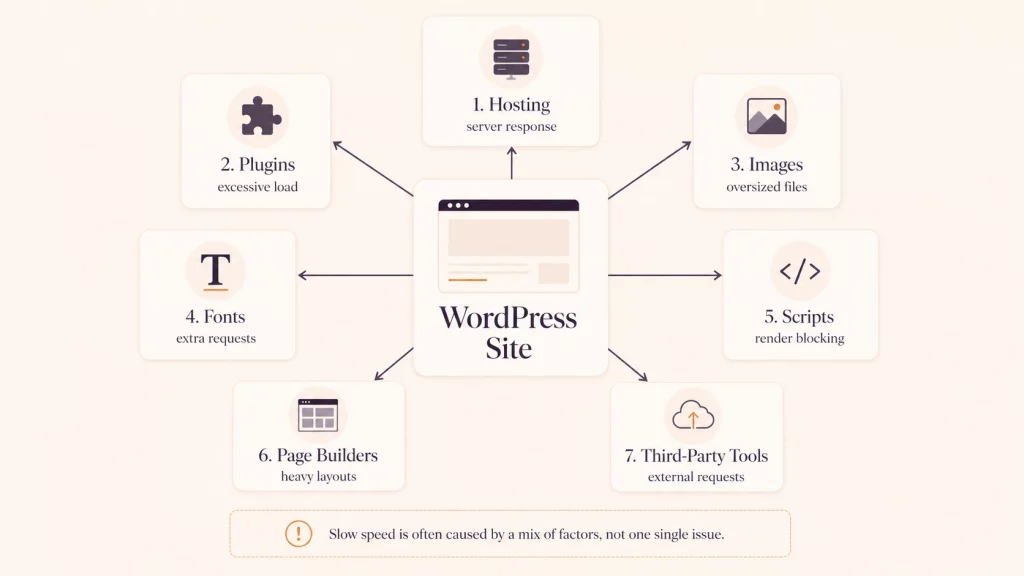
Performance plugins can be useful, but they work best when they solve a known problem. Installing several tools that handle caching, image compression, script delays and database cleanup can create overlapping settings and make troubleshooting harder.
WordPress recommends reviewing installed plugins, removing those that are unnecessary and selectively disabling plugins to see whether one is having a significant effect on performance.
Start by checking which plugins are active and what each one does.
WordPress sites often collect plugins over time. A feature may have been tested and abandoned, while the plugin remains active. Two plugins may perform similar tasks. A theme or page builder may now include a feature that once required a separate plugin.
Removing an unused plugin will not transform every website, but it reduces the number of components that need to load, update and remain compatible.
Do not remove plugins without checking what they control. Create a backup and test changes on a staging version of the website where possible.
Using several caching or script-optimisation plugins at the same time can create conflicts.
One tool may combine CSS while another delays it. Two plugins may both attempt to compress images or control lazy loading. Server-level caching may already be active while a WordPress plugin applies another caching layer.
More optimisation does not automatically mean more speed. To optimise WordPress speed effectively, choose tools based on the hosting environment and website setup rather than installing several plugins that perform similar tasks. Keep the configuration as simple as possible, then test after each meaningful change so you can see what has actually improved.
Images are often one of the easiest areas to improve without altering the website’s design.
The problem is usually not that a page contains images. The problem is that files are much larger than the space in which they appear, use inefficient formats or all load immediately even when they sit below the visible part of the page.
A photograph taken with a modern camera or phone may be several thousand pixels wide. If it appears in a website column that is only 800 pixels wide, the visitor may still download the much larger original file.
Resize images to suit their intended display area before uploading them. This reduces file weight without changing how the image appears on the page.
WordPress creates several image sizes automatically, but the website still needs to serve an appropriate version. Check that templates are not loading the full-size original where a smaller file would be enough.
Formats such as WebP and AVIF can reduce file sizes while maintaining good visual quality. Compression can make JPEG and PNG files lighter too.
The aim is not to reduce every image until it looks poor. Product photography, portfolio work and detailed illustrations still need to look professional.
Test the balance between quality and file size. A slightly larger image that presents the business well may be more useful than a heavily compressed image that looks blurred.
Large video backgrounds, autoplay content and image sliders can add significant weight to a page.
They can also create a weak mobile experience when the content takes too long to appear or important text becomes difficult to read.
This does not mean every slider or video must be removed. Consider what it contributes. A useful demonstration video may justify its weight, while a decorative background video might not.
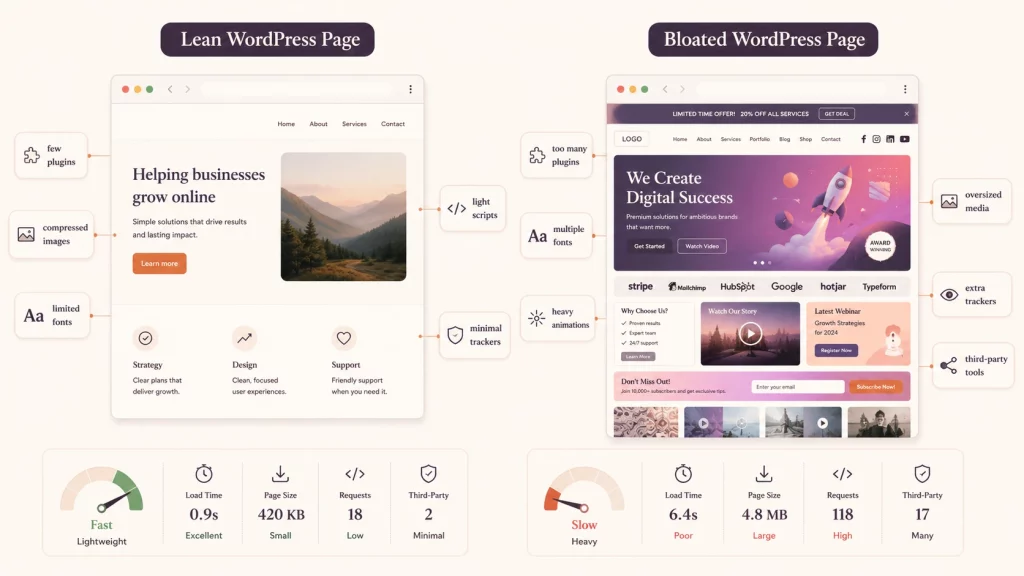
Page builders such as Bricks Builder and Elementor make WordPress websites easier to design and update, but layouts can become unnecessarily complicated over time.
A simple content section may sit inside several nested containers. Decorative elements may be repeated across templates. Old widgets can remain hidden rather than being removed. Global styles may compete with individual page settings.
These problems do not always require a full rebuild. Sometimes the best option is to simplify the existing templates.
Review how the most important pages are constructed.
Look for empty sections, duplicated containers, hidden desktop or mobile versions and layouts that use several elements where one would do the same job.
A page-builder interface can make these layers difficult to notice from the front end. The finished page may look clean while the underlying structure is doing more work than necessary.
Simplifying the layout can reduce HTML, CSS and JavaScript while making the page easier to edit later.
Animations, counters, sliders, pop-ups and interactive effects can support a page when they have a clear purpose. Problems begin when they are repeated or used mainly because the page builder makes them available.
Ask whether each effect helps the visitor understand the content or take the next step.
Removing one decorative animation may have little effect by itself, but simplifying several repeated features can create a leaner and more stable page.
Sometimes one or two templates cause most of the problem.
A service-page template may contain unnecessary widgets. A blog template may load a heavy related-post system. Product pages may include features that are not used by most products.
In these situations, targeted improvements to your existing build can simplify the underlying structure without replacing the brand, content and wider site architecture
This keeps the work focused. Instead of starting again, you improve the parts that are genuinely holding the website back
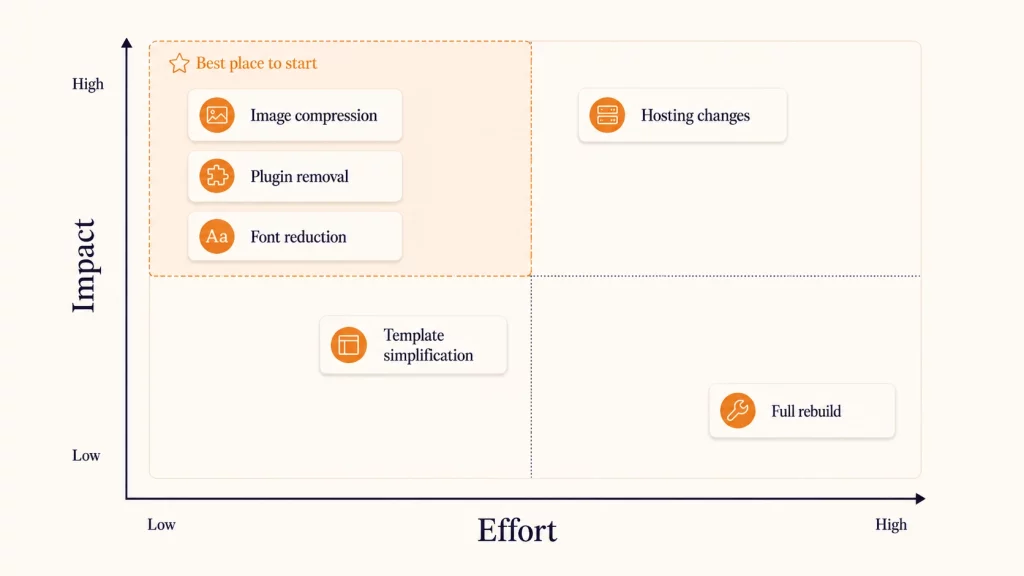
Some of the heaviest parts of a page are not visible as large design elements.
Fonts, analytics tools, chat widgets, maps, videos, advertising tags and social embeds can all add requests or delay the browser while it processes scripts.
Each tool may seem small on its own. Together, they can create a slow and unresponsive page.
A website may load several font families, each with multiple weights such as light, regular, medium, semibold and bold.
Most designs do not need every available variation. A smaller font set can reduce requests and make the visual system more consistent.
Check which weights are actually used across the website. Remove unused versions and consider hosting fonts locally where it suits the setup and licensing terms.
Some tools do not need to load before the visitor can read or use the main page content.
A chat widget might be delayed until the page has loaded. A video can use a preview image until someone chooses to play it. A map may load only after the visitor interacts with it.
The exact method depends on the tool and consent setup. Test carefully because delaying a script can affect tracking, forms or other features if handled poorly.
Websites often retain tools after campaigns, staff members or suppliers have changed.
Old analytics tags, unused heatmaps, abandoned chat systems and duplicate tracking scripts can remain active for years.
Review third-party tools regularly. Confirm who owns them, what data they provide and whether anyone still uses that information.
A slow website is not always caused by its design.
Hosting, server resources, caching and the WordPress environment all affect how quickly pages can be prepared and delivered. A clean website can still feel slow if the hosting setup no longer matches its needs.
A small brochure website and a WooCommerce store place different demands on a server.
Ecommerce sites process baskets, accounts, product data and checkout actions. Membership websites and booking systems may also need more resources than a simple information site.
Check whether the hosting plan suits the website’s traffic, features and business importance. Cheap hosting is not automatically poor, but a plan designed for small, low-traffic sites may struggle as the website grows.
Caching stores prepared versions of content so the server does not have to rebuild the same page for every visitor.
Caching may happen through WordPress, the server, a content delivery network or a combination of these. The setup needs to work as one system.
Incorrect caching can create problems with forms, baskets, logged-in users or frequently changing content. Configure it around the website rather than applying the same settings to every page.
Plaudit’s product-page speed case study provides an example of targeted work within an existing Elementor and WooCommerce website, including improvements to caching and the delivery of static assets rather than a complete rebuild.
WordPress core, plugins, themes and the server environment should be kept current and compatible.
Updates may include performance improvements, bug fixes and security changes. However, applying everything immediately to a live business website can create risk when plugins or custom features interact.
Use backups and staging where possible. Test important journeys such as forms, logins, bookings and checkout after updates.
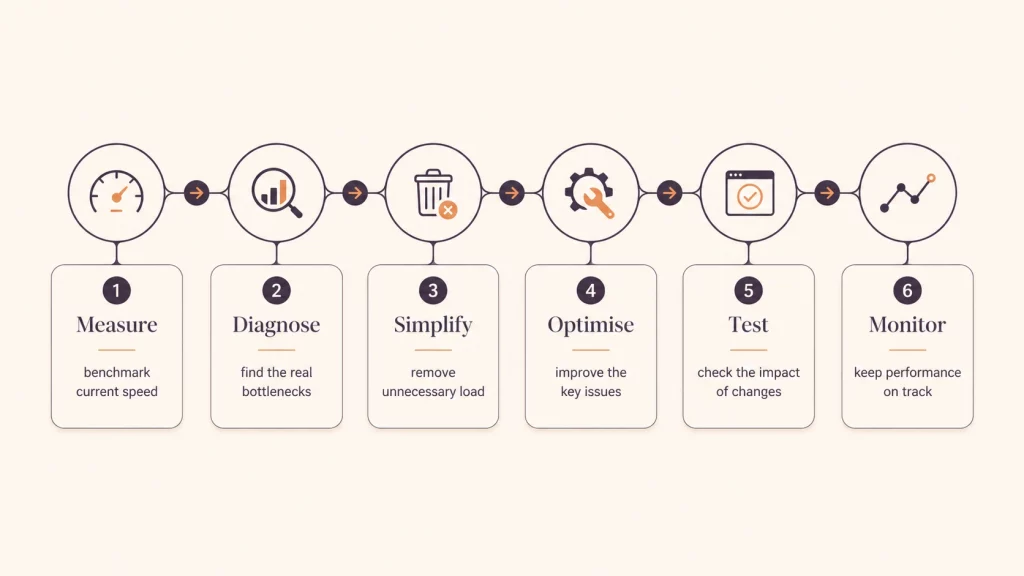
A performance report may contain dozens of recommendations. Trying to implement all of them at once makes it difficult to understand what helped and what caused a new problem.
A better approach is to rank fixes by likely benefit, effort and risk.
Oversized images, unused plugins, unnecessary scripts and excessive font files are often reasonable starting points.
These changes can reduce page weight without altering the wider design or functionality.
The exact priorities will vary. A site dominated by uncompressed photography may benefit most from media work, while another site may be held back by a booking platform or a badly constructed template.
A staging website is a private copy used for testing.
It allows you to update plugins, change templates and adjust performance settings without experimenting on the live site.
Staging is particularly important when making changes to caching, script loading, ecommerce pages or page-builder templates. A setting that improves one page may break another feature.
Large batches of changes make comparison difficult.
If you remove plugins, alter caching, change the theme and replace the hosting at the same time, you may see an improvement but not know which action produced it.
Work through the priorities in stages. Record the pages tested, the settings changed and the results.
Performance tools are helpful, but a score should not become the only goal.
Core Web Vitals focus on loading performance, responsiveness and visual stability. These metrics help describe parts of the user experience, but they still need context.
A faster page that loses an important form, product image or booking feature is not an improvement.
Use the same pages and similar testing conditions when comparing results.
Test mobile against mobile rather than comparing a mobile result with a desktop result. Check more than one page and repeat tests because network and server conditions can vary.
Record the starting point before changing anything. Without that baseline, it becomes harder to prove whether the work helped.
Look beyond the technical report.
Can visitors read and interact with the page sooner? Do forms work reliably? Has the mobile experience improved? Are people reaching key service, product or contact pages?
Analytics and conversion data can add useful context. Performance work should support what the website is meant to achieve, whether that is generating enquiries, selling products or helping people find information.
A UK-based service business had a WordPress website that had gradually become slower over time as new features were introduced. The site relied on a page builder, several marketing plugins, a booking form, multiple font weights, and large images that were often uploaded directly from a camera.
The business owner assumed the website needed to be rebuilt. The marketing manager was more concerned about preserving the existing content, URLs and lead-generation pages.
The homepage was not the slowest page. The biggest problems appeared on service pages that used a heavier template and on the contact page, where a map, form and tracking scripts loaded together.
Several plugins were also performing overlapping jobs. One handled caching, another delayed scripts and a third added image optimisation. The website was difficult to troubleshoot because too many tools were changing the same assets.
The work started by testing the pages that mattered most to enquiries. The existing setup was then reviewed before anything new was installed.
Unused plugins were removed, image dimensions were reduced, fonts were self-hosted and the service-page template was simplified. The map was delayed until interaction, while caching settings were consolidated into one clear setup.
The changes were tested on staging and introduced in stages. The design, branding, content and URL structure stayed in place.
The website became noticeably faster and easier to manage without a full rebuild. The client also had a clearer understanding of which tools were essential and which had been adding complexity without enough value.
The project did not rely on an unrealistic promise or a single plugin. The improvement came from diagnosis, simplification and targeted changes to the existing build.
Improving the existing website is often more efficient than replacing it, but optimisation has limits.
A rebuild may become the better option when the foundations are outdated, the website is difficult to maintain or every small improvement creates another compatibility problem.
An abandoned theme or page builder creates more than a performance problem.
It may stop receiving compatibility fixes and security updates. New WordPress or PHP versions may cause features to fail, while replacing individual parts becomes increasingly difficult.
If the site depends heavily on unsupported software, rebuilding on a maintained system may be safer than continuing to patch it.
Some websites contain years of overlapping plugins, custom code, template overrides and temporary solutions.
When each update breaks another feature, targeted optimisation can become expensive and unstable. The team may spend more time protecting old workarounds than improving the site.
A rebuild can remove that complexity, but only after the important content, URLs, tracking and search visibility have been properly reviewed.
Performance may be only one sign of a wider problem.
The website may have an unclear structure, outdated messaging, poor mobile journeys or features that no longer match how the business operates.
If the site needs major changes to its content, navigation, design and functionality, a rebuild may provide better long-term value than optimising templates that will soon be replaced anyway.
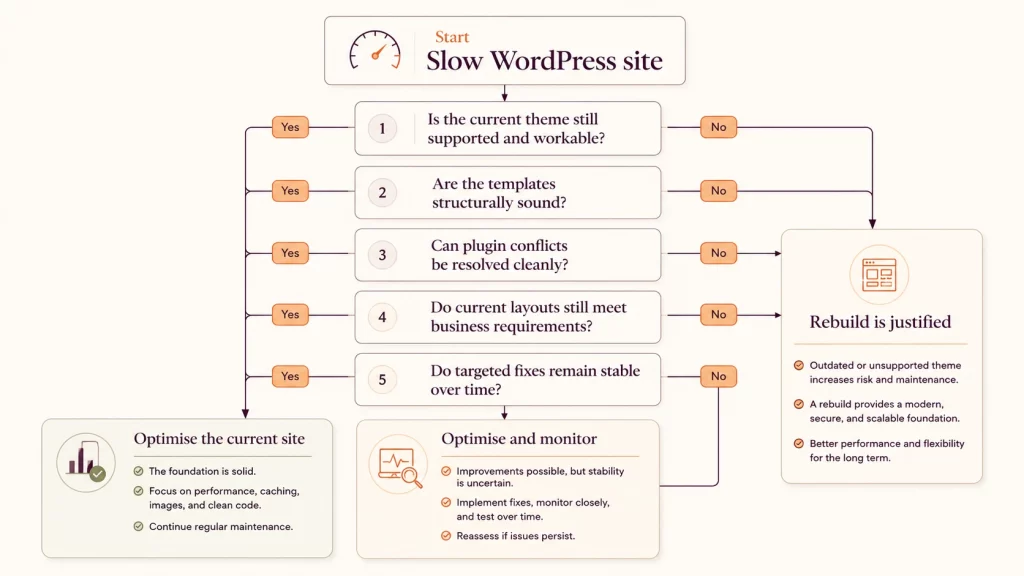
A slow WordPress website does not automatically need to be rebuilt. The most reliable approach is to test the pages that matter, find the real bottlenecks and work through the fixes in a sensible order.
Good WordPress speed optimisation is usually less about installing more tools and more about simplifying what is already there. Images, plugins, templates, fonts, scripts, caching and hosting should work together rather than compete with one another.
When targeted changes remain stable and support the website’s goals, the existing build may still have plenty of life left in it. When the foundations are unsupported or no longer fit the business, the evidence will make the case for rebuilding much clearer.
Yes. Many WordPress sites can be improved by optimising images, removing unused plugins, simplifying templates, reducing third-party scripts and configuring caching correctly. The best fixes depend on what is causing the slowdown.
Oversized images, unnecessary plugins, excessive fonts and heavy external scripts are often useful areas to review first. However, testing should come before changes because hosting or a specific template may be the real cause.
The number alone is not always the problem. A small number of poorly built or resource-heavy plugins can have a greater effect than a larger group of lightweight plugins. Review what each plugin does, remove unused tools and avoid duplicated features.
A faster site can improve user experience and make pages easier to use, especially on mobile. Speed is only one part of SEO, so performance work should sit alongside useful content, crawlability, internal linking and a clear website structure.
A rebuild may make sense when the theme or page builder is unsupported, repeated fixes keep causing new problems or the website no longer meets the needs of the business. It should be based on the condition of the whole site rather than one performance score.

Actionable strategies to turn visitors into customers and blow your competitors out of the water. ...
What Oxfordshire businesses want in 2026, and how it compares to the hype
TL;DR probably not